Frequently Asked Questions
What is the portal?
Why do I get an error message when I click the back button?
What are breadcrumbs?
How do I find handouts/assignments that professors put on the portal?
Can I print a transcript using the portal?
I don't understand the transactions on my account balance. Is there something wrong with my account?
After I Withdraw from a Class why does the Class still show on my schedule/course list?
What is the portal?
The Grace portal has been designed to serve as a virtual point-of-contact for members of the campus community. It provides a secure and customizable entry point to essential information-sharing tools for prospects, students, faculty and administrators.
The Grace portal also includes all the resources you need to print your schedule, add/drop classes, view your account balance, and viewing your grades.
Why do I get an error message when I click the back button?
The Grace portal is more than just a simple website. While you browse within the Grace portal many values are stored about your visit - i.e. Who you are, what content you have permission to view, what page you just visited, etc. When you press the back button
these values are lost and the portal can sometimes "forget" who you are or where you are supposed to be within the portal. As an alternative you should navigate the portal using breadcrumbs. See the FAQ on breadcrumbs here.
What are breadcrumbs?
Breadcrumbs are the preferred method of moving "back" in the portal to the previous page that you were viewing. You may have found already that if you click the back button in your browser that you receive a very rude error message from the Grace portal. The solution is to not click the back button and use the breadcrumbs.
So what do breadcrumbs look like? If you look at the image below you will see an example outlined in black.
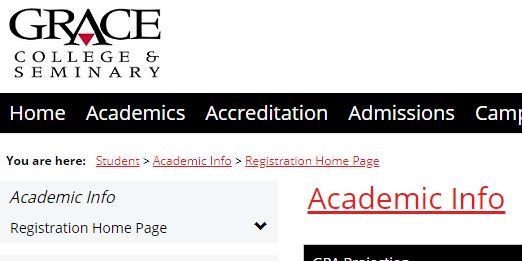
In this example if you wanted to move back to the main page of the student tab you could click the Student link in the breadcrumbs. Sometimes within the portal breadcrumbs do not exist for the previous page that you were viewing. In this case you may have to click on the previous tab you were using. Just remember to keep moving forward in the portal and don't click your back button.
How do I find handouts/assignments that professors put on the portal?
Professors use the Moodle Learning Management System to create an online space for each class. They can distribute files (i.e. PDF handouts, Powerpoint presentations, etc), provide discussion forums, and display grades and feedback.
The easiest way to access Moodle from the Portal is to use the Moodle shortcut on the Home tab. You can also access this page by navigating to https://grace.learninghouse.com. A new window will open, and you will be prompted to log in. After logging in, expand the menu for the appropriate term in the "Courses Aviliable to You" box on the left, or simply locate the course under the My Courses heading on the main part of the page. You can then click the desired course and you will be taken to the LMS page for that class.
Can I print a transcript using the portal?
You cannot print official transcripts from the portal. However you can print a Grade Report or a Course History with grades. It will not carry the same authority as an official transcript from the registrar's office. If you need an official transcript contact the registrar's office.
To print either a Grade Report or a Course History with grades click on the Student Tab. Click the Registrar's Office link (located on the left of the page). You will now see a page which includes portlet's entitled 'Course History' and 'Grade Report'. In order to run the Grade Report portlet select the term and then click the 'View Final Grade Report' link or the 'View Midterm Grade Report'.
I don't understand the transactions on my account balance. Is there something wrong with my account?
Sometimes there may be transactions pending on your account or even transactions that haven't appeared on your account yet (i.e. Financial Aid). If you have questions about your account you should call the Business Office.
After I Withdraw from a Class why does the Class still show on my schedule/course list?
When you are withdrawn from a class you are still technically enrolled in the class as a student. The difference is that a W is entered for your final and midterm grade.